
OTWONO LABS / NOTEBOOK
Organizing information: make the right item easy to retrieve
Learn one step at a time, with examples, practice and a place for your questions.
Start this lessonPractical communication · LESSON 3 OF 4
Choose simple labels and filters that answer a real retrieval question without creating conflicting copies.
Before you start: Recognize a file and folder. Practice on paper or with fictional items; there is no need to move real files.
Suggested pace: 20 to 35 minutes, with extra time for practice. You can stop after any section and return.
Start with something concrete
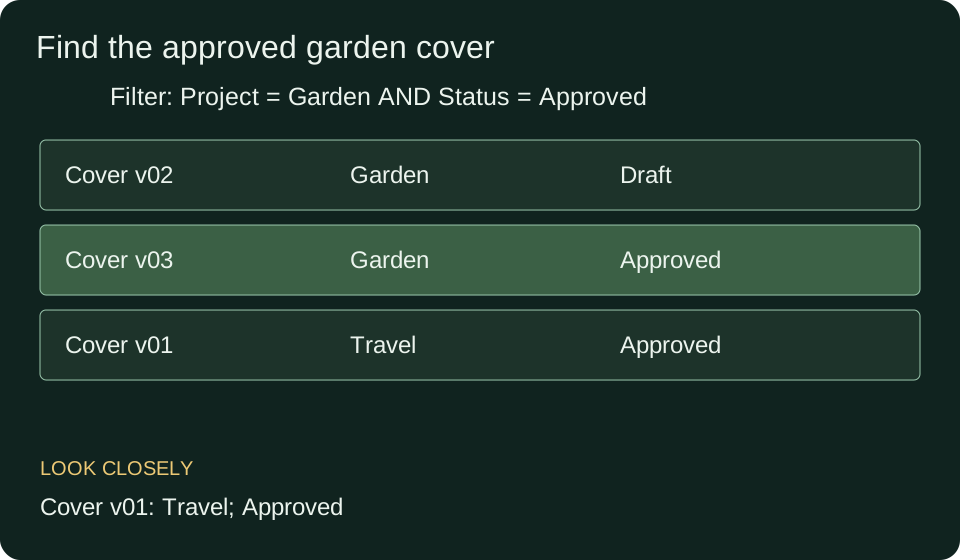
You have three cover files: a garden draft, an approved garden cover and an approved travel cover. Someone asks for the approved garden cover. A useful system must distinguish both the project and the review status.
The words we will use
- Field
- A named property, such as project or review status.
- Filter
- A condition used to keep matching items in a result list.
- Tag
- A label that describes an item without requiring a separate copy.
- Authoritative item
- The copy or record your process treats as the source of truth.
Understand the idea
Start with the question people need to answer. If they ask by project and status, store those as consistent fields. Organizing everything by color would not directly answer this question.
Apply one condition at a time. Filtering Project = Garden removes the travel cover. Filtering Status = Approved removes the garden draft. Both conditions together leave the desired item.
A label does not prove the fact it describes. ‘Approved’ should come from the agreed review process, not from someone adding the word to a filename. If two records claim current approval, investigate the conflict.
Teacher example: find the approved garden cover
- Read each row as a file with a project and status.
- Keep only Garden records. Two rows remain.
- Keep only Approved among those rows. The Garden version 03 row remains.
- Use the authoritative review record to confirm that this is the intended current version.
Connect the example to the rule
A folder gives a file a location. Tags can describe multiple topics without making several copies. A note about planning a book may have both Writing and Project planning tags while remaining one note. Test whether your chosen software supports the retrieval paths you need.
Your turn, with support
What remains if you filter only by Approved in the example?
Show one hint
Look for that status in both projects.
Compare your working
The approved garden cover and the approved travel cover both remain. Status alone is not enough.
A mistake worth understanding
Copying one file into many folders creates independent versions that can diverge when one is edited. A stable original with supported references or tags can avoid that confusion. Verify your tools before assuming copies synchronize.
Check the idea before moving on
The interactive questions load when JavaScript is available. You can still use all written practice below.
Now solve without the example
- Choose fields to find travel recipes that need review.
- Explain why ‘final final newer’ is an ambiguous name.
- Describe a test for whether another person can use your organization system.
Check the independent answers
- Project, item type and review status.
- It does not define a reliable revision order or approval state.
- Ask them to retrieve a specified item without your help and explain why it matches. Check accuracy as well as effort.
Use it in a new situation
One learning note is about writing and planning and contains an open question. How could it appear under all three searches without three copies?
Compare a possible solution
Keep one authoritative note with both topic tags and an Open question status, or maintain an index pointing to the same note.
What to take away
Begin with retrieval questions, use consistent fields, keep a clear source of truth and test whether someone can find the right item.
Before your next lesson
Close this page and explain the main idea in your own words. Rework one of the independent problems without looking. If a step is still unclear, return to the worked example and compare that exact step. Tomorrow, try the transfer problem again before opening its answer.
For a saved introductory check, open this lesson in your signed in workspace and choose Tests. Practice choices on this page are not a qualification or a substitute for independent work.
Next in this path: Visual design: help a reader know where to look and what to do